
Metrics over time
One metric per week or month, compared with your own baseline.
Updated 1 min read
Where: Journal → Analytics → Analytics → Evolution
Follow a metric
- Click the Analytics tab and pick Evolution in the family selector. It opens Metrics over time.
- Click Weeks or Months.
- Click Bars or Line.
- Open the metric selector on a chart and pick a metric, such as Win rate.
- Hover a period to read its value.
The two charts each show one metric per period. You can pick Net, Expectancy, Win rate, PF, Avg R, Trades, Average duration, Average size or Risk per trade.
What's on the screen
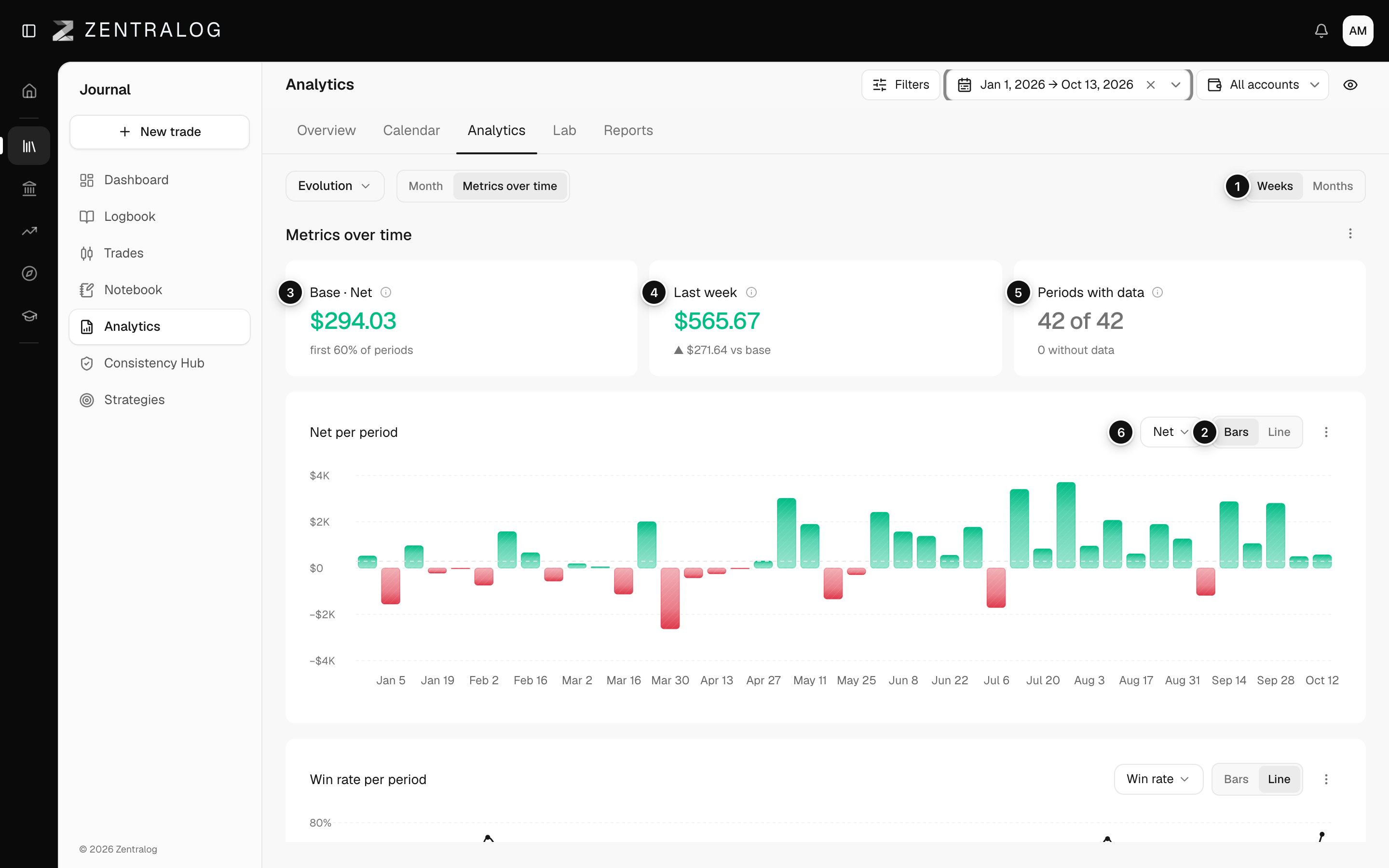
- Weeks / Months: the size of each period.
- Bars / Line: the chart type.
- Base: your baseline, the average of the first 60% of periods with data.
- Last week or Last month: the latest period against your baseline.
- Periods with data: how many periods have enough trades.
- Metric per period: two charts, each with its own metric selector.
A gap is not a zero. Periods with fewer than 3 trades are left blank.
FAQ
Why does it say no baseline yet?
There aren't enough periods with data to build a baseline. Widen the date range or switch to Weeks.
Related
Did this answer your question?