
News feed
A live stream of market headlines from official sources, filtered by category, ticker or the markets you trade.
Updated 1 min read
Where: Markets → Feed
Find the news you need
- Click Feed in the Markets panel.
- Stay on Global for all news, or click My feed for the tickers you trade.
- Pick a category: Macro, Stocks, FX, Crypto or Commodities.
- Type in the search box to find a headline, source or ticker.
- Click a headline to read it on the original site, in a new tab.
- At the bottom, click Load 10 more for older headlines.
The feed refreshes on its own about every minute. On the side you'll find Sentiment timeline, Upcoming releases and the Sources used.
What's on the screen
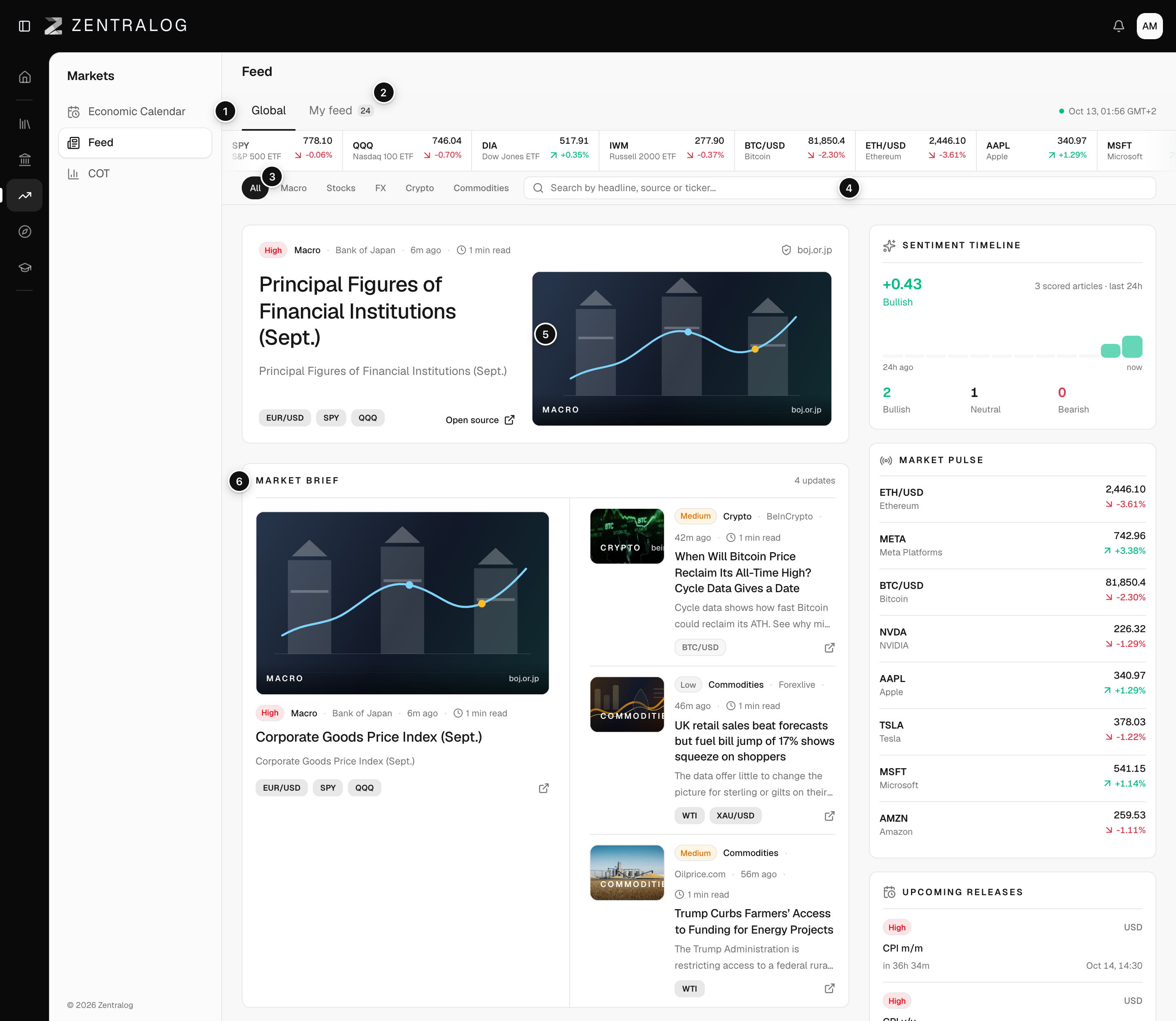
- Global: all market news.
- My feed: only news on tickers you have traded.
- Categories: filter by Macro, Stocks, FX, Crypto or Commodities.
- Search: search by headline, source or ticker.
- Top story: the most relevant recent headline; opens the original source.
- Latest headlines: a list that loads ten headlines at a time.
FAQ
Why is My feed greyed out?
It needs at least one trade. Add or sync a trade and My feed turns on.
Can I read the full article inside Zentralog?
No. Headlines open the source's own page in a new tab.
Related
Did this answer your question?