
Economic calendar
A calendar of macro releases, like jobs or inflation data, with their expected impact on markets.
Updated 1 min read
Where: Markets → Economic Calendar
Filter the releases
- Click Economic Calendar in the Markets panel.
- Open Impact and pick High, Medium, Low or Holiday.
- Open Currency, type a currency like USD and pick it.
- Click Clear filters to see everything again.
See a day or a week
- In Month view, click a day to see all its releases.
- Switch to Week for one column per day.
- Use the arrows to move back or forward, and Today to come back.
Each release shows its time, currency, title and impact. Tentative means the official date isn't confirmed yet and may move.
What's on the screen
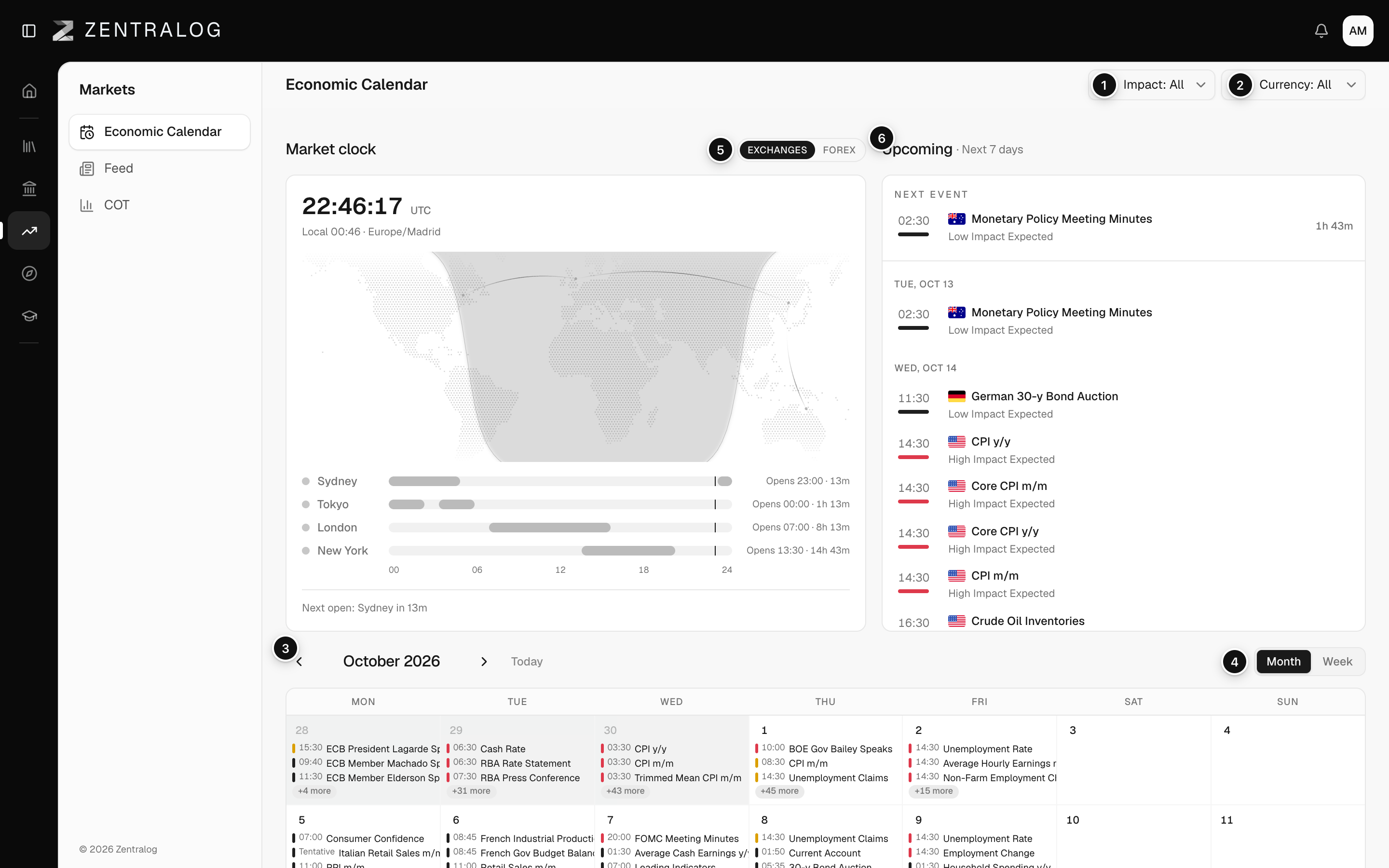
- Impact: filter releases by expected impact.
- Currency: filter by currency, with search and flags.
- Arrows: move back or forward a month or a week.
- Month / Week: switch between the month grid and week columns.
- Day: click a day to see all its releases.
- Upcoming: the next seven days, with a countdown to the next event.

FAQ
Which timezone are the times in?
The timezone in your settings. Change it in Regional settings.
Why did my filters change on the dashboard too?
The calendar and the dashboard calendar widget share the same Impact and Currency filters.
Related
Did this answer your question?