
Notifications
The bell in the top bar tells you when your weekly or monthly report is ready.
Updated 1 min read
Where: the bell in the top bar, next to your initials
Open a report from the bell
- Look at the bell in the top right. A number on it counts the notices you haven't read.
- Click the bell to open Notifications.
- Click a notice, for example Your weekly report is ready.
- The report opens in Analytics → Reports, and the notice is marked as read.
Your weekly report arrives every Monday, and your monthly report on the 1st of each month. See Weekly and monthly reports.
Clear the unread number
- Click the bell.
- Click Mark all as read at the top of the menu. It only shows when something is unread.
What's on the screen
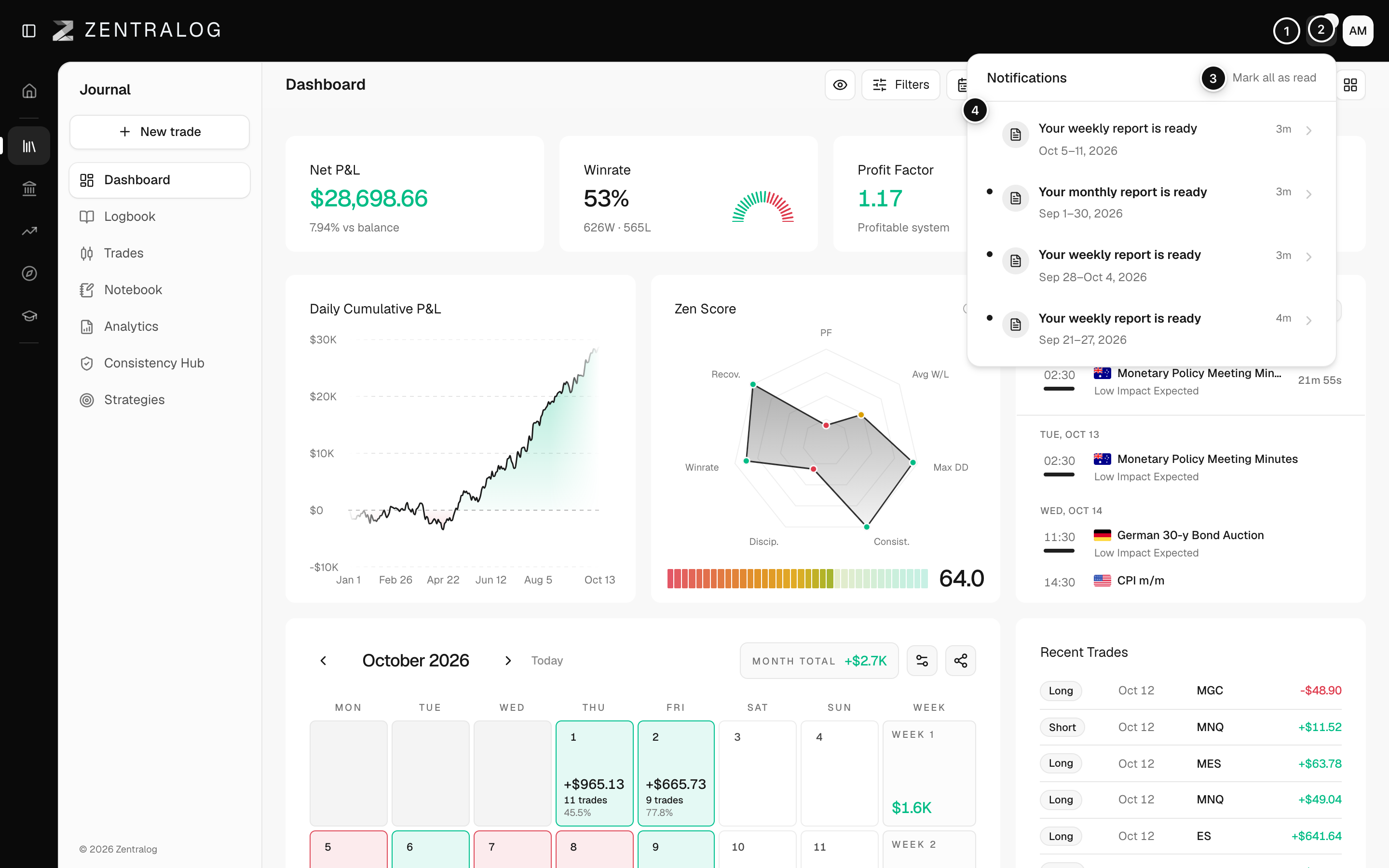
- Bell: opens your notifications.
- Unread number: how many notices you haven't opened yet.
- Mark all as read: clears the unread number in one click.
- Report notice: weekly or monthly, with its dates and how long ago it arrived.
FAQ
The menu says «You have no notifications».
Nothing new has arrived yet. Report notices appear here as soon as a report is ready.
Can I turn notifications off?
Not for now. The bell only shows notices about your reports.
Related
Did this answer your question?