
COT radar
The Radar ranks every instrument of a sector by how close its positioning is to a three-year extreme.
Updated 1 min read
Where: Markets → COT → Radar
Scan a sector
- Open COT and pick a sector tab.
- Click Radar.
- Read the table from the top: the first rows are closest to an extreme.
- Click a row to open that instrument in Single.
The ranking uses the 3-year percentile: where this week's net position sits against the last three years, from 0 to 100. Near 0 or 100 is an extreme. Near 50 is normal.
Each row follows one group: Non-Commercial in Legacy, Leveraged Funds in Disaggregated and TFF.
What's on the screen
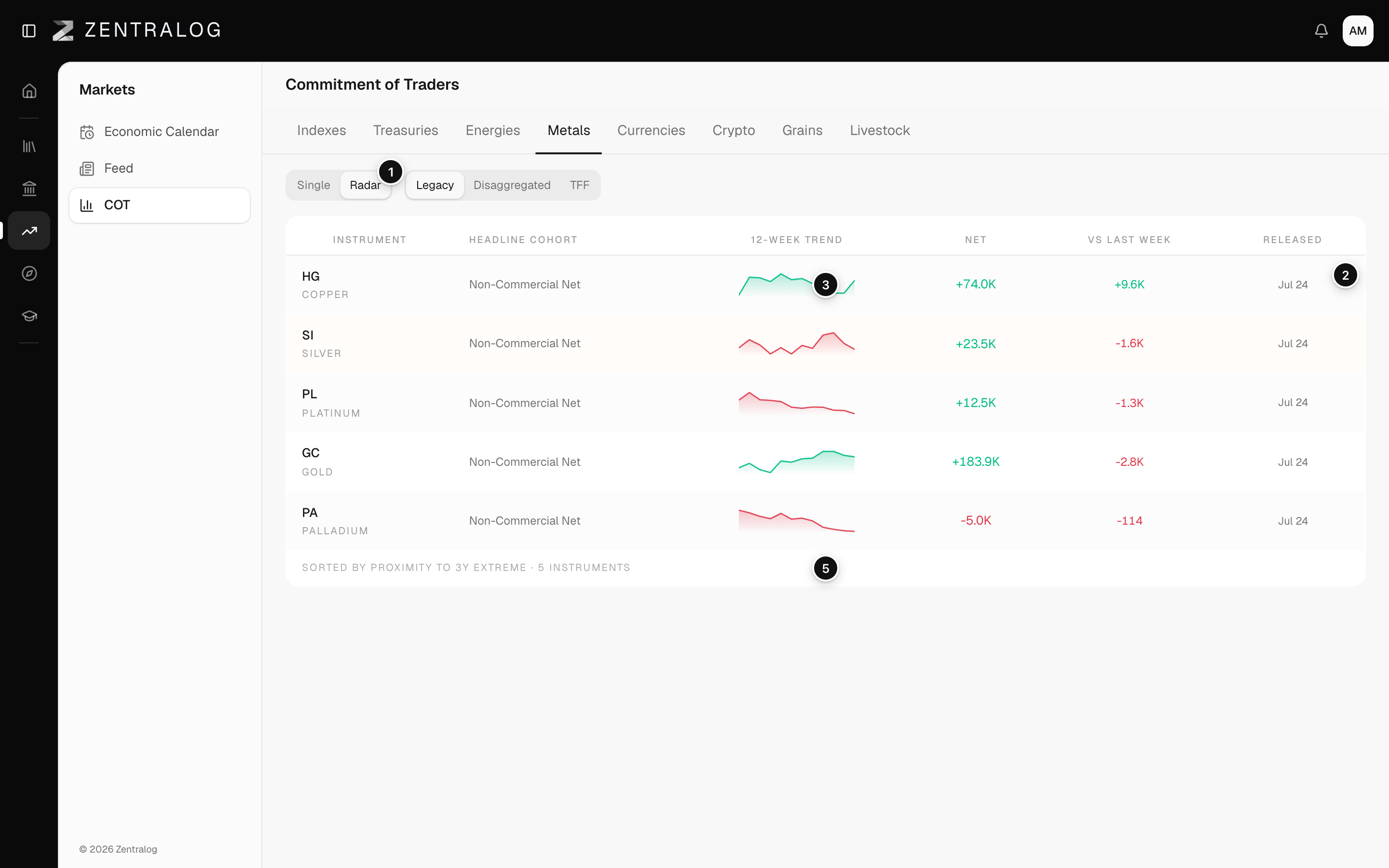
- Radar: scan every instrument in the sector at once.
- Columns: the headline group, its 12-week trend, the net position and the weekly change.
- Top row: the instrument closest to a 3-year extreme. Click to open it.
- fresh: data from the latest CFTC release.
- Sorted by proximity: rows ranked by distance to the 3-year extreme.
FAQ
Does an extreme mean the price will turn?
No. It only says positioning is unusual. Past behavior is not a forecast.
Why is the Radar empty?
That sector has no instruments with data yet. Try another sector.
Related
Did this answer your question?