
COT signals
Automatic reads of the COT data that compare current positioning with the last three years.
Updated 1 min read
Where: Markets → COT → Single → bottom of the page
Read the signals
- Open COT and pick an instrument in Single.
- Scroll to the bottom of the page.
- Read Historical context: the last time positioning was at this level, and what happened four weeks later.
- Read the three cards: Positioning Signal, Risk Context and Historical Extremes.
The reads use the 3-year percentile, from 0 to 100. Above 90 or below 10 counts as an extreme. Between 20 and 80 is neutral.
Risk Context looks at open interest: rising means new money is coming in; falling means positions are closing.
What's on the screen
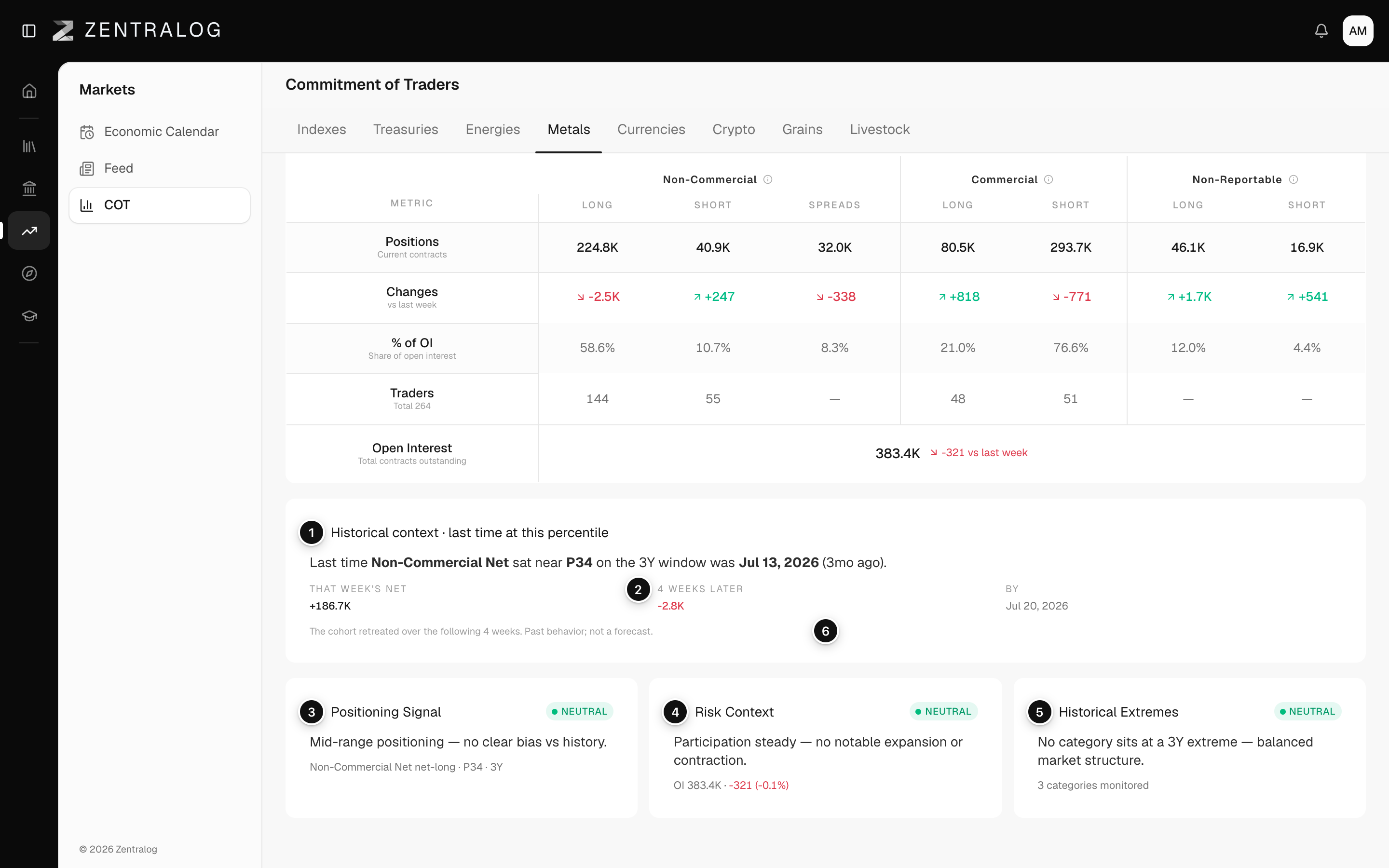
- Historical context: what happened last time at this percentile.
- 4 weeks later: the net move four weeks after that week.
- Positioning Signal: an automatic read of the current positioning.
- Risk Context: how crowded the trade looks right now.
- Historical Extremes: Extreme, Elevated or Neutral versus three years.
- Past behavior; not a forecast.: history, not a prediction.
These reads describe the data. They are not trading advice or price forecasts.
FAQ
Why is Historical context missing?
It needs at least 30 weeks of data for that instrument.
Related
Did this answer your question?