
Accept a mentor invitation
Your mentor invites you by email. You accept in Zentralog and join their mentorship.
Where: the invitation email, or Mentorship → Your invitations
Accept from the email
- Open the email from your mentor and click View the invitation →.
- Click Sign in and use the email that received the invitation. No account yet? Click Create account with that same email.
- The invitation opens in a window. Read what your mentor will see and what they won't.
- Tick the box to accept the mentorship conditions.
- Click Accept and join.
Accept from the app
- Click Mentorship in the rail.
- In Your invitations, click View invitation.
- Tick the conditions box and click Accept and join.
You land on My mentor. The rail now has a Mentorship section with your mentor's pages.
Decide later closes the window. The invitation waits in Your invitations until it expires. Decline turns it down.
What's on the screen
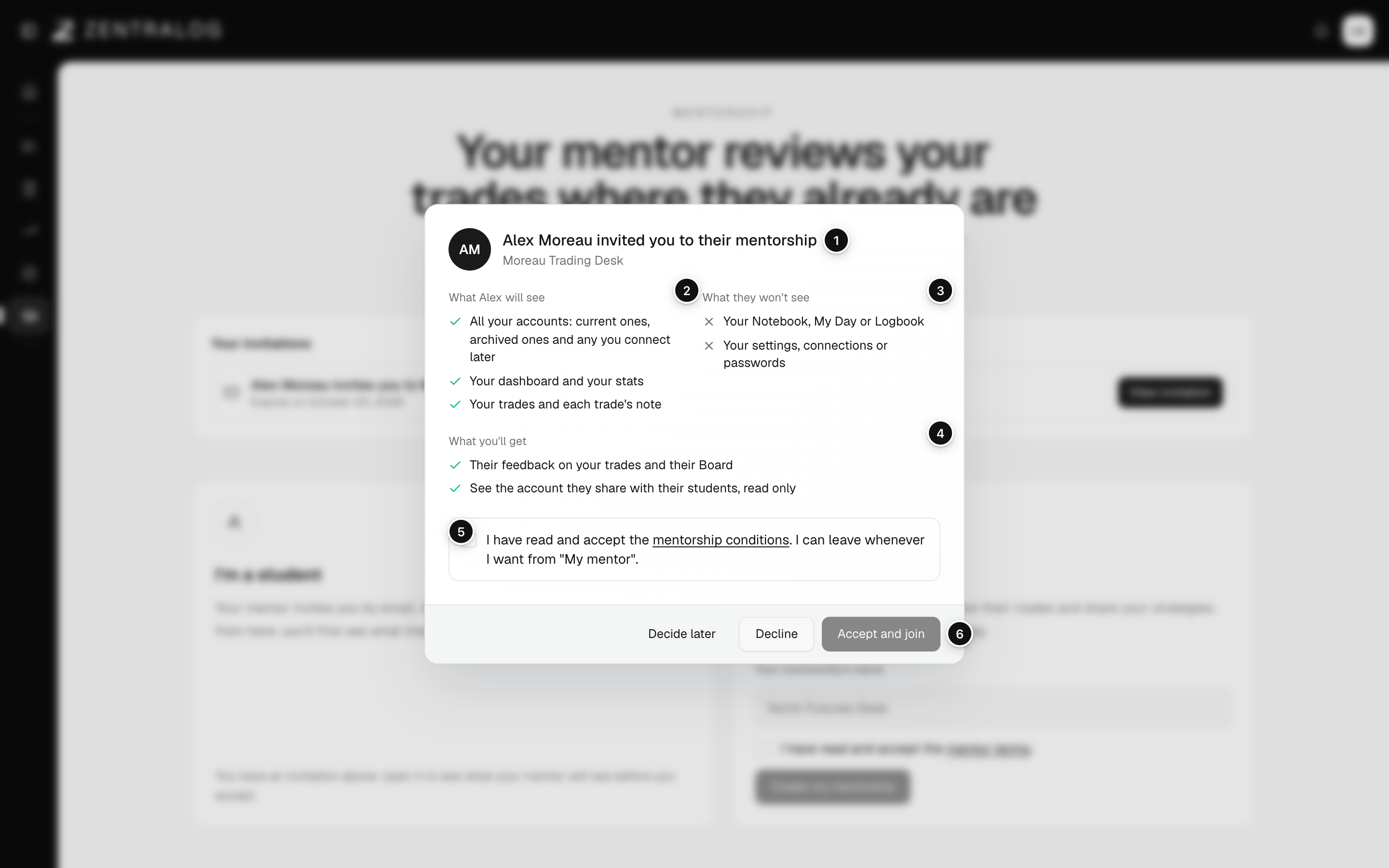
- Invitation: who invites you and to which community.
- What they will see: your accounts, dashboard, trades and trade notes.
- What they won't see: your Notebook, My Day, Logbook, settings and passwords.
- What you'll get: feedback on your trades, their Board and the account they share.
- Conditions box: tick it to accept. The link opens the full text.
- Accept and join: joins the mentorship. Decline and Decide later sit next to it.
An invitation lasts 7 days and only works with the email it was sent to. That email must be confirmed before you can accept.
FAQ
The link says the invitation has expired. What now?
Ask your mentor to invite you again. If they resent it, use the link in the newest email.
It says the invitation is for another email.
You are signed in with a different account. Click Sign out and sign in with the email that got the invitation.
Can I be in two mentorships?
No. If you accept a new invitation, you leave your current mentorship, and you keep its feedback. A mentor can't be a student in another community.
Related
Did this answer your question?