
What your mentor sees
Your mentor sees your trading read-only. Your journal, settings and payment details stay private.
Updated 1 min read
Where: Mentorship → My mentor → Your privacy
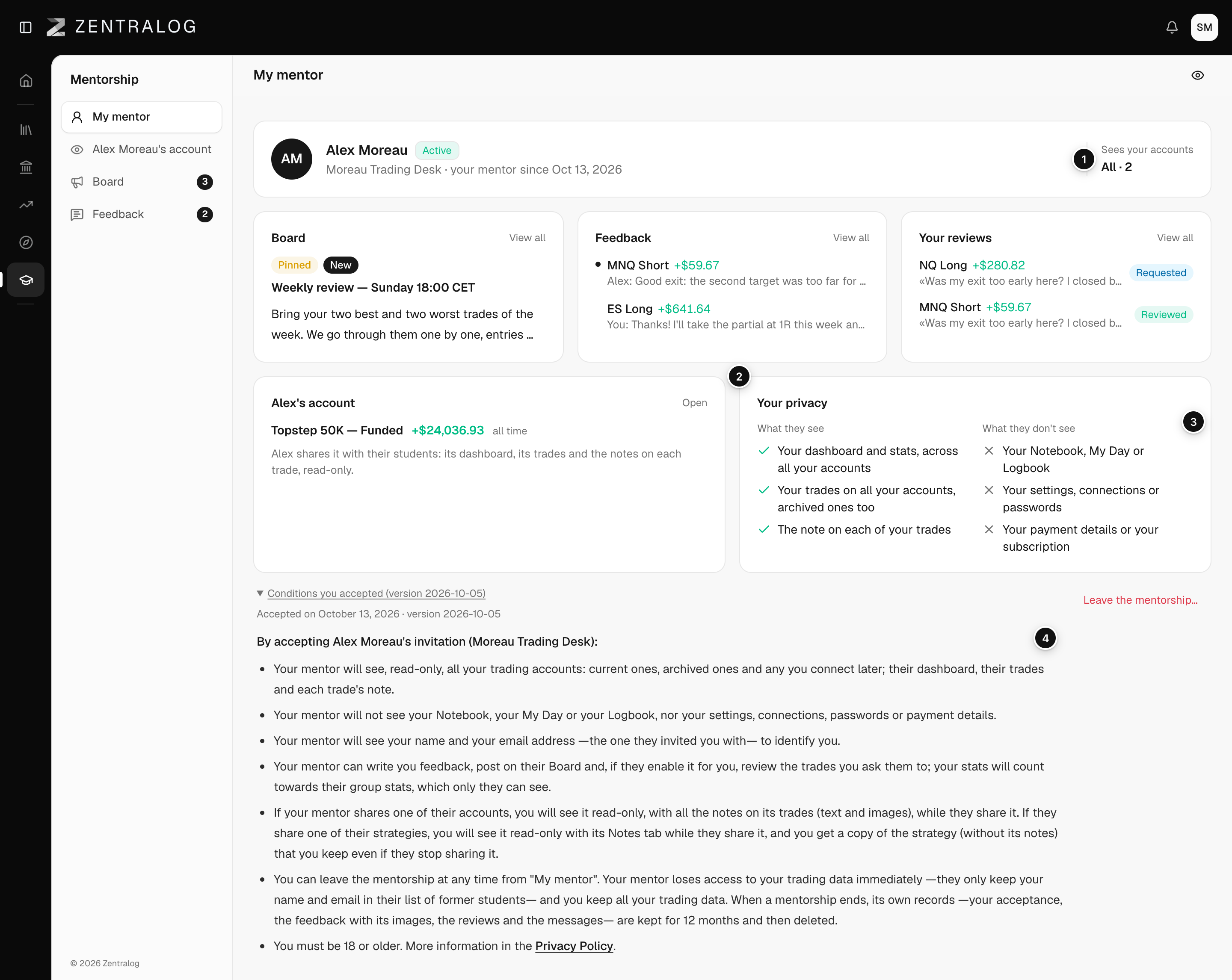
What your mentor sees
- Your dashboard and stats, across all your accounts.
- Your trades on all your accounts: archived ones too, and any you connect later.
- The note on each of your trades.
All of it is read-only. Your mentor can't change anything.
What your mentor doesn't see
- Your Notebook, My Day or Logbook.
- Your settings, connections or passwords.
- Your payment details or your subscription.
Check the conditions you accepted
- Open My mentor.
- Scroll to the bottom of the page.
- Click Conditions you accepted.
- Read the date, the version and the exact text you accepted.
What's on the screen
- Sees your accounts: always All, with how many accounts. Hover it for details.
- What they see: the three things your mentor can read.
- What they don't see: what stays private.
- Conditions you accepted: the text you agreed to when you joined.
To stop sharing, leave the mentorship. Your mentor stops seeing your data right away. See Leave a mentorship.
FAQ
Can I choose which accounts my mentor sees?
No. Your mentor sees all your accounts. Sees your accounts shows how many.
Can other students see my trades?
No. Only your mentor sees your data. The feedback on a trade is between you and your mentor.
Related
Did this answer your question?