
General feedback
Write to a student about something that isn't one trade, and read all your conversations with them.
Updated 1 min read
Where: Mentorship → Students → a student → Feedback
Read your conversations
- Open a student and click the Feedback tab. It shows how many messages are new.
- Pick a filter: All, Unread or Reviews.
- Click a conversation in Threads to read it.
- If it is about a trade, click Open trade to see it.
Write general feedback
- Click New general feedback.
- Write your message.
- To add one of the student's trades, type / and pick Student's trade. Search by instrument or account.
- Click Publish.
What's on the screen
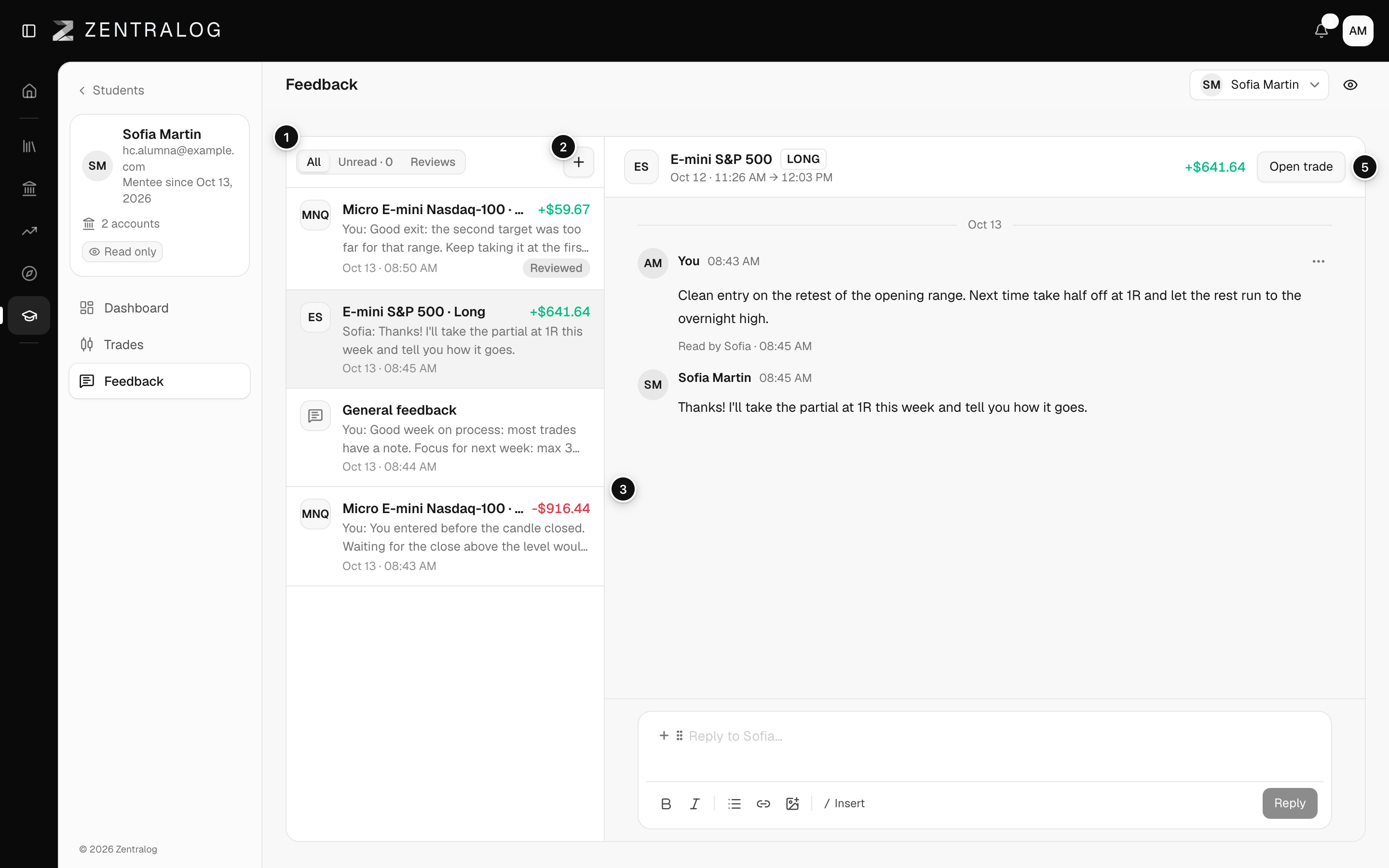
- Filters: All, Unread and Reviews.
- New general feedback: a message that isn't about one trade.
- Threads: every conversation with this student.
- Open thread: the messages and your student's replies.
- Open trade: goes to the trade the thread is about.
FAQ
Who can read general feedback?
Only you and that student.
It says Trade unavailable.
The trade that conversation was about is no longer in the student's account. The messages are still there.
Related
Did this answer your question?