
Leave a mentorship
You can leave your mentorship at any time. Your mentor stops seeing your data right away.
Updated 1 min read
Where: Mentorship → My mentor → Leave the mentorship…
Leave
- Open My mentor.
- Scroll to the bottom and click Leave the mentorship….
- Read the window. To go on, click Leave the mentorship. To cancel, click Stay.
What happens next
- Your mentor stops seeing your data right away.
- You keep all your accounts, trades and notes.
- You keep your feedback, read-only. Click See my feedback on the Mentorship page.
- Strategies from your mentor stay as Copy from your mentor. See Strategies from your mentor.
- The Mentorship page says you left, and you can accept another invitation.
What's on the screen
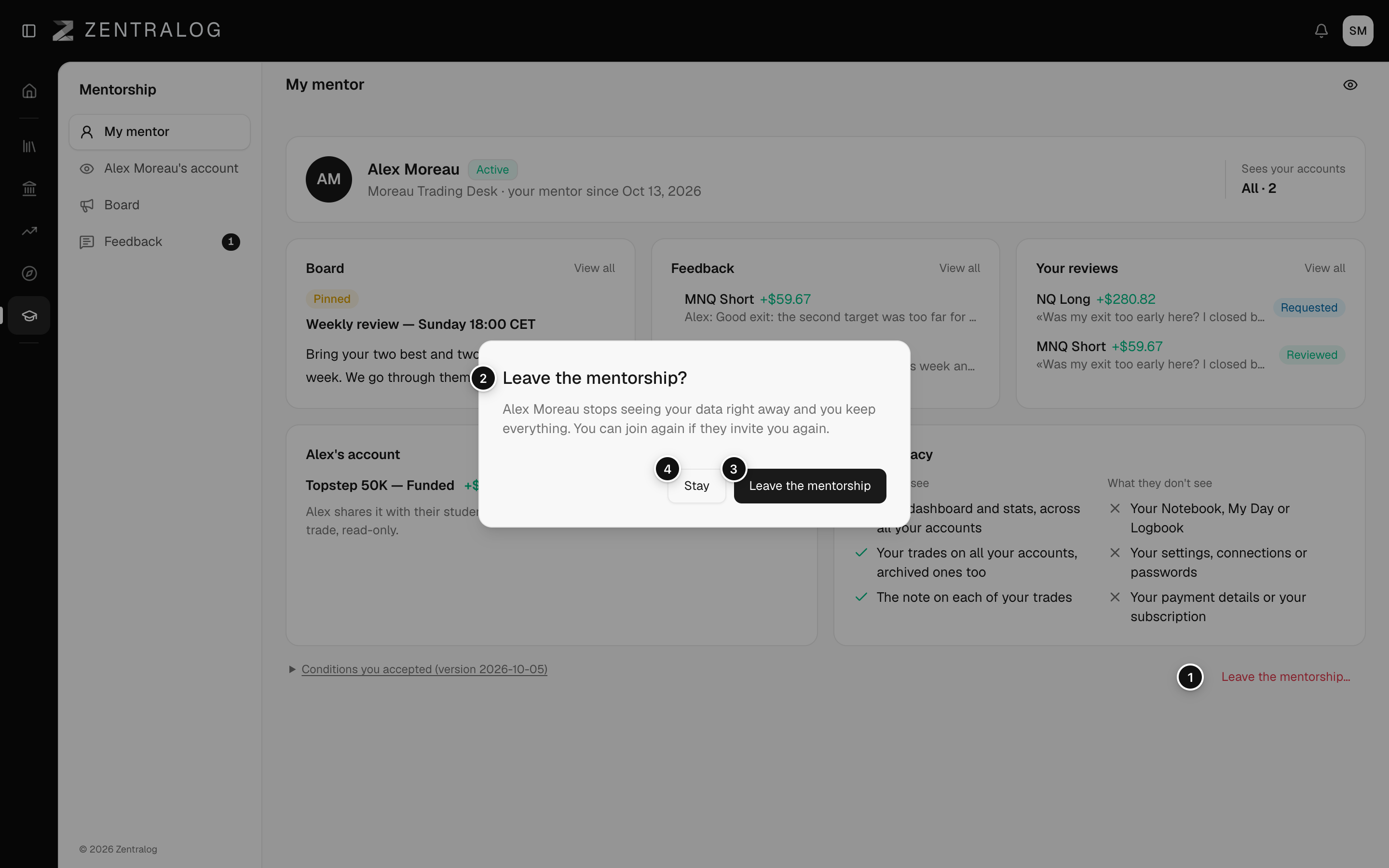
- Leave the mentorship…: at the bottom of My mentor.
- Leave the mentorship?: what happens when you leave.
- Leave the mentorship: confirms. It takes effect at once.
- Stay: closes the window and keeps you in.
To come back, your mentor has to invite you again.
FAQ
What if my mentor ends the mentorship?
The Mentorship page tells you. Everything else is the same as when you leave.
Can I join another mentor?
Yes. Accept their invitation. See Accept a mentor invitation.
Related
Did this answer your question?