
Break-even threshold
The setting that decides when a trade counts as a win, a loss or break-even.
Updated 1 min read
Where: your avatar → Settings → Outcome
A break-even trade ends with almost no profit or loss. The threshold sets how close to zero that is. Example: with a threshold of 5, a trade that made +$3 or lost −$4 counts as break-even.
Set the threshold
- Open Settings and click Outcome.
- In Break-even threshold, type an amount in your currency. Use 0 to switch it off.
- Click Save trading settings. You will see «Trading settings saved.»
What's on the screen
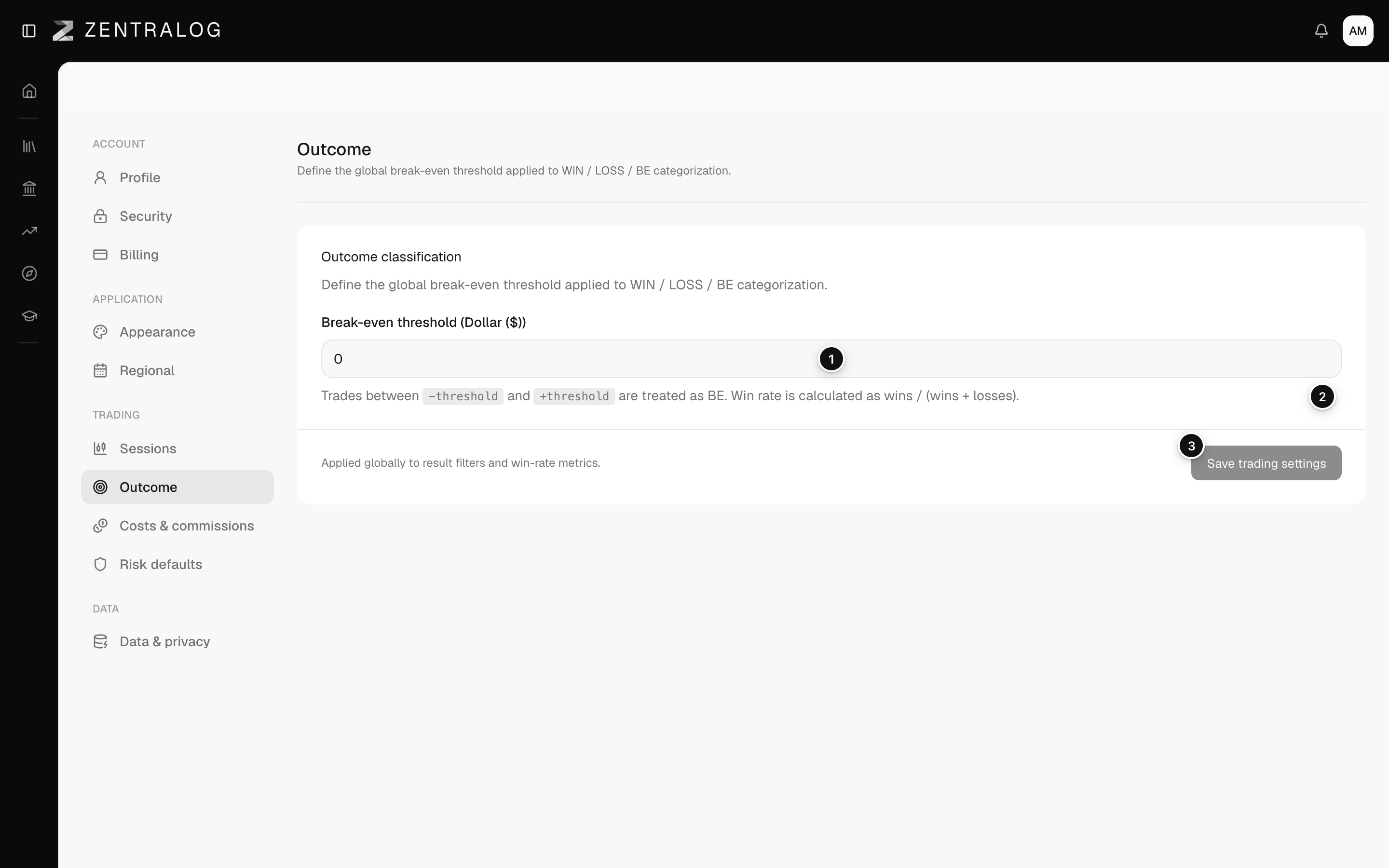
- Break-even threshold: trades within plus or minus this amount count as break-even.
- Help text: win rate is wins divided by wins plus losses, so break-even trades don't count.
- Save trading settings: applies the threshold to every metric and filter.
The threshold never changes your P&L. It only changes how trades are labelled, and so your win rate.
FAQ
My win rate changed after I changed the threshold. Why?
Small wins and losses moved in or out of break-even, and break-even trades are left out of the win rate.
Can I use a negative number?
No. Type zero or a positive amount. It works in both directions.
Related
Did this answer your question?