
Change your password
The Security page, where you change the password you use to sign in to Zentralog.
Updated 1 min read
Where: your avatar → Settings → Security
Change your password
- Open Settings and click Security in the sidebar.
- Type your Current password.
- Type a New password with at least 10 characters.
- Type it again in Confirm new password.
- When both requirements turn green, click Update password. You will see «Password updated.»
What's on the screen
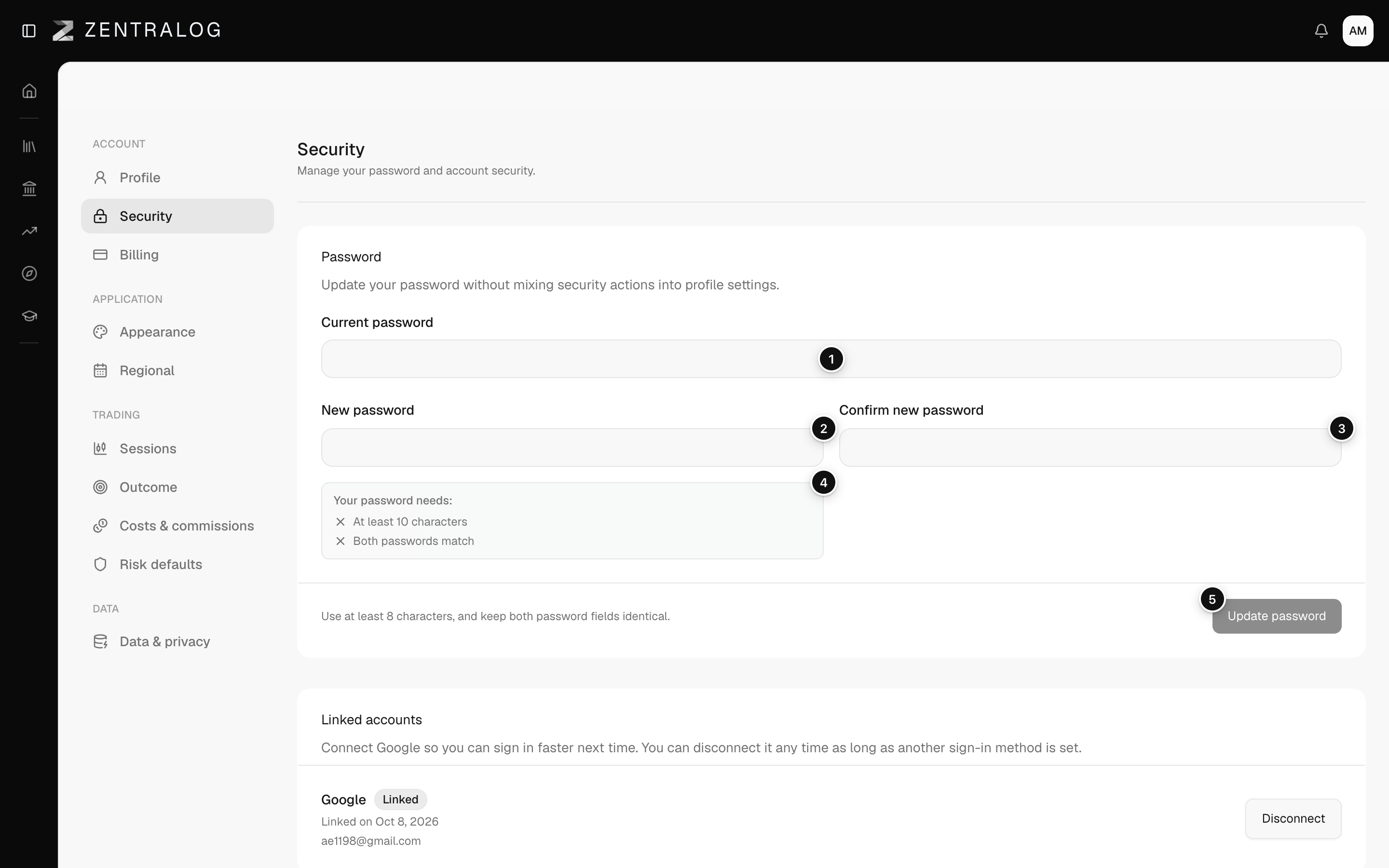
- Current password: needed to confirm it is you.
- New password: at least 10 characters.
- Confirm new password: repeat it to avoid typos.
- Requirements: each one turns green when you meet it.
- Update password: turns on once every requirement is met.
FAQ
It says my password is too common.
Zentralog rejects passwords that are common or have appeared in leaks. Choose a less usual one that mixes letters, numbers and symbols.
I forgot my current password.
Sign out and use the password reset on the sign-in page. See Sign in and password.
Related
Did this answer your question?