
Tools catalog
A catalog of partner trading tools, like order-flow platforms, picked to work alongside your journal.
Updated 1 min read
Where: Discover → Tools
Browse the tools
- Click Tools in the Discover panel.
- Look at the Featured tool at the top, then the grid below.
- Click View Details to open a tool's page inside Zentralog.
- Click Visit … to go to the partner's own website.
- Scroll to On the roadmap for tools coming soon.
Zentralog doesn't sell these tools. Sign-up and payment happen with each partner.
What's on the screen
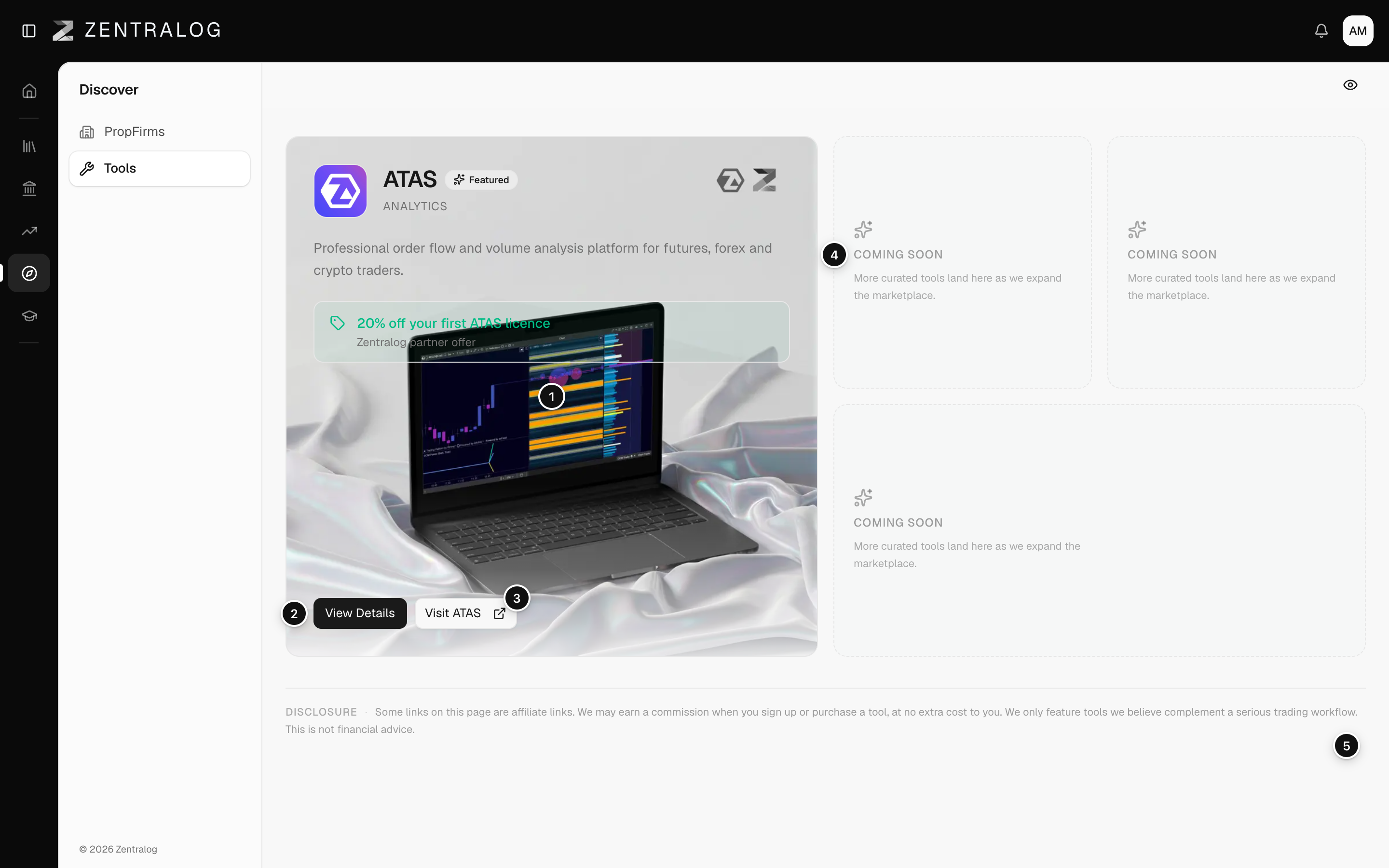
- Featured card: the featured partner tool.
- View Details: opens the tool's page.
- Visit: goes to the partner's website.
- On the roadmap: tools coming soon.
- Disclosure: the note about affiliate links.
Some links are affiliate links. Zentralog may earn a commission if you sign up or buy, at no extra cost to you. It's not financial advice.
FAQ
Why does it say No tools yet?
The catalog is still growing. New tools appear here when they're added.
Do I need these tools to use Zentralog?
No. They're optional. Your journal works without any of them.
Related
Did this answer your question?