
Read a report
A full-screen reader that walks you through one weekly or monthly report, card by card.
Where: Journal → Analytics → Reports → Open report
Open and move through a report
- In Reports, click Open report, or a row under Previous.
- Press → or ← to move one card. On a phone, swipe.
- Click a chapter in the Sections rail to jump to it.
- Press Esc or click Close report to go back.
The chapters: Summary, Your week (or Your month), Your focus, Your normal, Day by day, Calendar, Timing, What you trade, Process, Patterns, Risk, Zen Score, Key trades, Your plan and Wrap-up. See Zen Score.
Turn the plan into a rule
- Go to Your plan and read the proposed rule and what it would have saved.
- Click Add to Hub to make it a Consistency Hub rule. If it already exists, you see Tighten in Hub or Keep in Hub.
- Or click Save as a commitment. The next report reminds you of it.
Share a card or the summary
- Click Share on a card, or Share summary in Wrap-up.
- Pick a format (1:1, 16:9 or 9:16) and a background.
- Turn on Hide amounts to show R instead of money.
- Click Copy image or Download PNG.
What's on the screen
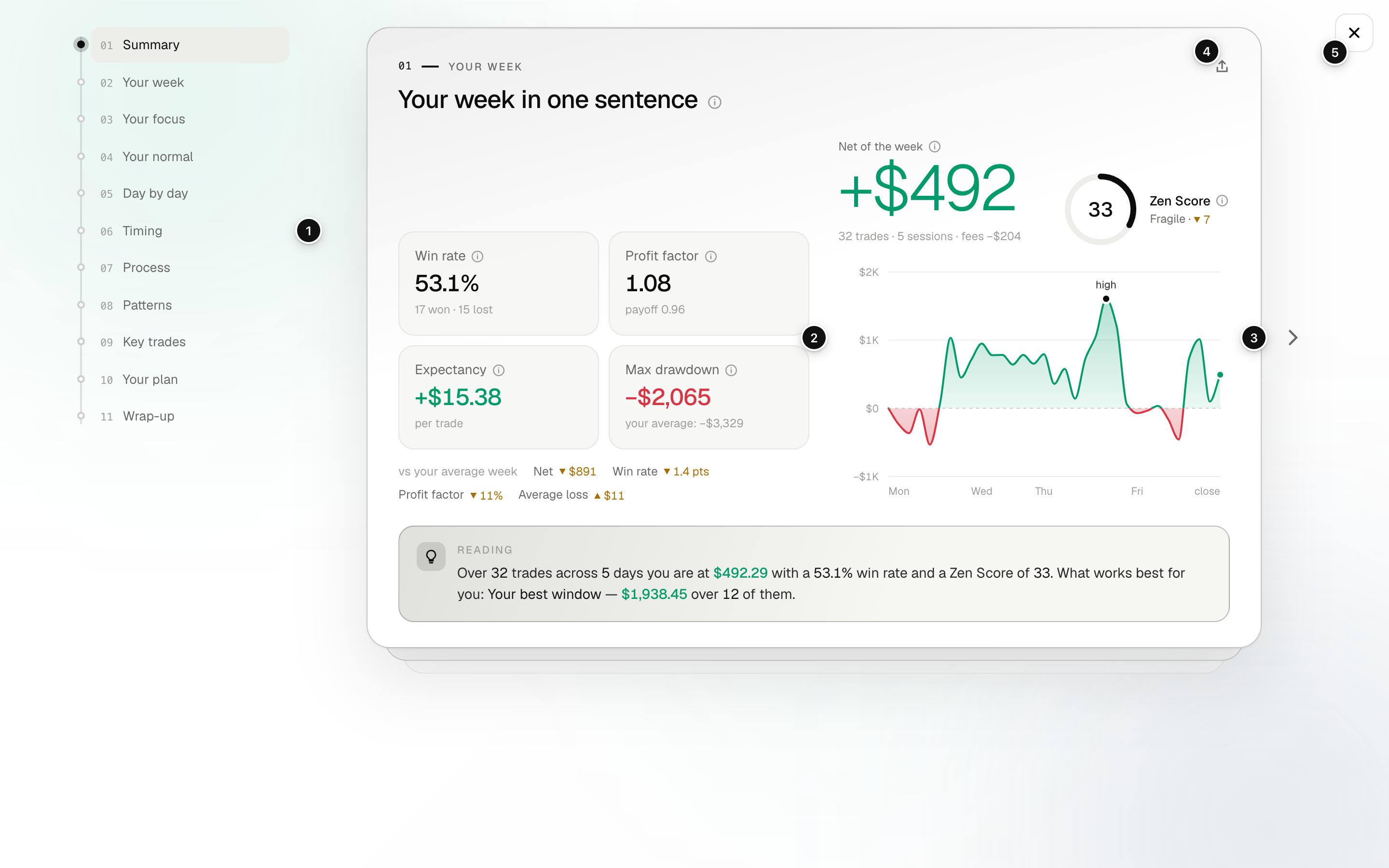
- Sections: every chapter; click one to jump.
- Card: one question about your period, answered with figures and a chart.
- Previous / Next: move one card back or forward.
- Share: makes an image of this card.
- Close report: back to the Reports tab.
If you edit trades of the period after the report was made, a banner says so: click Update. This creates a new version of the same period.
FAQ
Why can't I use Hide amounts?
It needs a registered risk on at least half of the period's trades, so there is a 1R to convert to. See R-multiple.
Why is there no rule in Your plan?
Either you do not have enough history yet, or no pattern had enough trades. You can still move the trades-per-day cap to see what it would cut.
Where do I see what a figure means?
Click the ⓘ next to it for Definition and Reading.
Related
Did this answer your question?