
The Consistency Hub
Your discipline page — the rules you set for yourself, whether you kept them today, and your streaks.
Updated 2 min read
Where: Journal → Consistency Hub
Check today's discipline
- Click Consistency Hub in the Journal group of the sidebar.
- The first time, the rules editor opens by itself. See set your rules.
- Look at Today. Your rules are grouped by moment of the day: Preparation, Trading and Close.
- Each rule says how it is going in words, for example «2 trades outside hours» or «3 of 5».
- Click a rule you created yourself to tick it. The count of rules kept goes up right away.
- Click Open My Day → to go to your day.
Read your numbers
- Read Clean streak at the top left. Best streak, below it, is your record.
- Read Compliance: the share of rules you kept in the last 30 days. The pts compare it with the 30 days before.
- Scroll down to Your rules. Each row shows its Streak, What you achieve on average and its Compliance.
What's on the screen
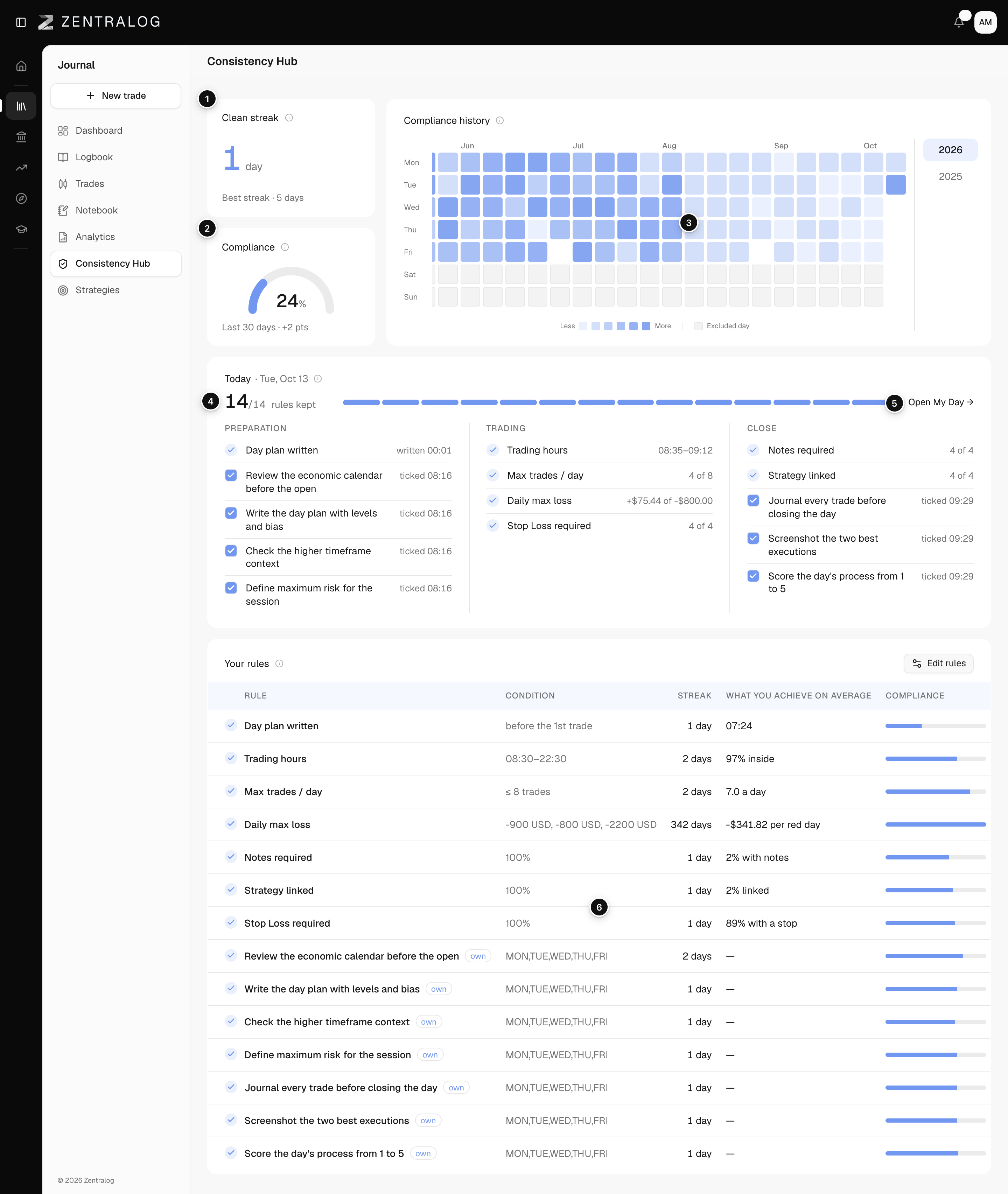
- Clean streak: days in a row you kept every rule (clean streak). Days without trades don't break it or extend it.
- Compliance: rules kept ÷ rules checked in the last 30 days (compliance), with ± pts against the 30 days before.
- Compliance history: one square per day for the whole year. See your discipline history.
- Rules kept today: one bar segment per rule. Blue is kept, red is broken, empty is pending.
- Open My Day →: opens today in My Day.
- Your rules: each active rule with today's status, its condition, streak, your real average and its compliance. Your own rules carry the tag own.
The Hub measures discipline, not profit. A losing day can still be a clean day.
FAQ
Why does Today say today isn't a trading day?
Today is not one of the trading days you chose, so rules aren't scored. Change your days with Edit rules in Your rules.
What does What you achieve on average show?
Your real average over your last 30 days with trades. For example, the share of trades opened inside your hours, your trades per day or the share of trades with a stop. Your own rules show «—».
Why does Compliance show a dash?
No day in the last 30 days was scored yet. The pts only appear when there are 30 earlier days to compare with.
Related
Did this answer your question?