
My Day
A page for one trading day, in three steps — Plan before the open, Session while you trade, Close when you finish.
Updated 2 min read
Where: Today → Plan the day
Plan your day
- On the Today page, click Plan the day. My Day opens on today.
- Write your plan in the day note. It saves on its own.
- Optional: click Templates to start the note from a template you saved.
- Check Day rules to see the rules you set in the Consistency Hub.
- Glance at Today's events for the economic news of the day.
- Under How are you arriving?, pick the mood that fits.
Open another day
- Use the arrows next to the date to go to the previous or next day.
- Or click the date to open a calendar and pick any day.
- A past day opens on 3 Close. A future day opens on 1 Plan and is marked Upcoming.
What's on the screen
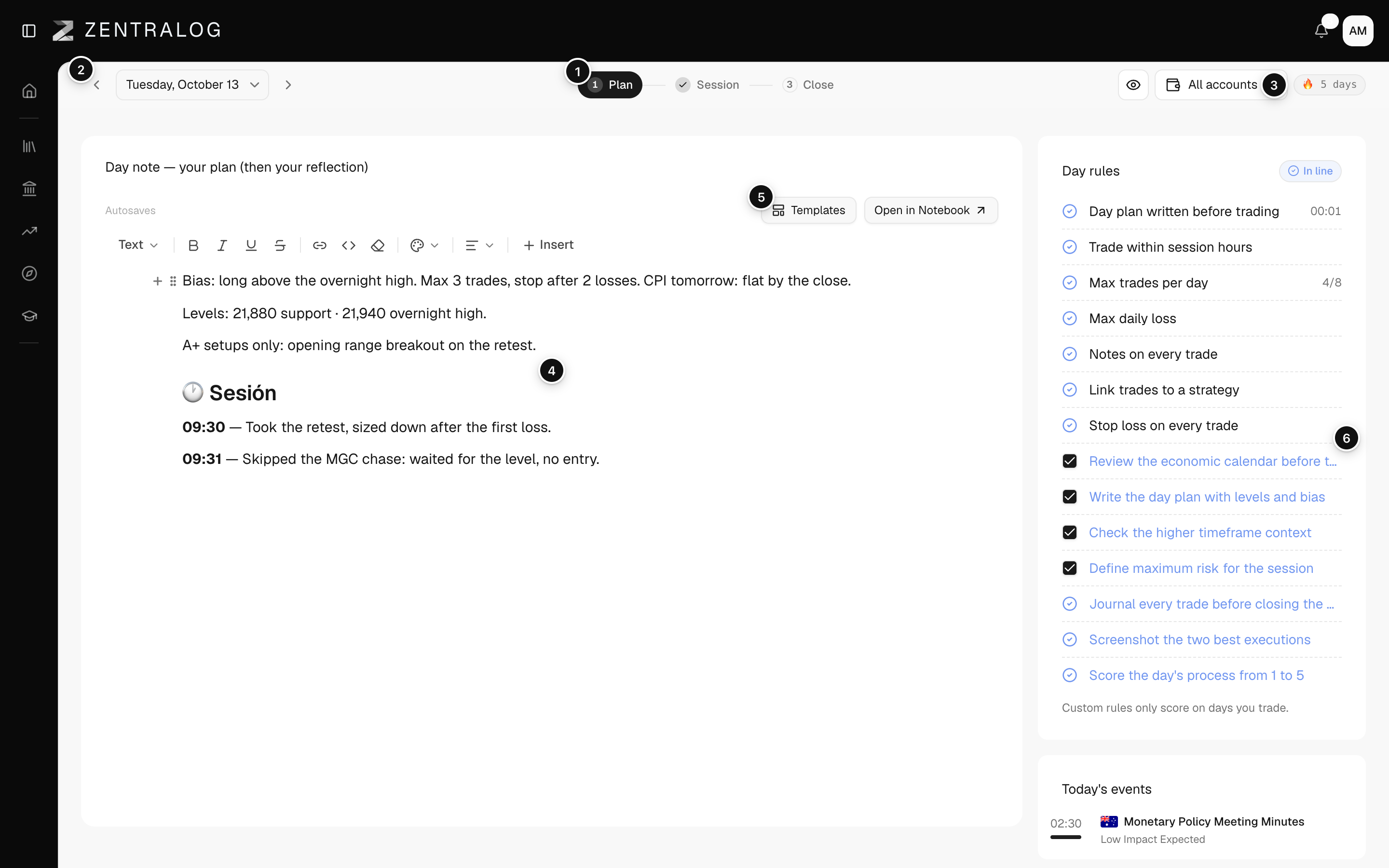
- Steps: 1 Plan, 2 Session and 3 Close. Click any of them to change the view.
- Day arrows: move to the previous or next day.
- Streak: your streak of days within your rules. It only shows on today.
- Day note: one note for the whole day. Plan first, reflection later.
- Templates: start the note from one of your saved templates.
- Day rules: each rule with its status. The chip says In line, Broke rules or Excluded.
The day's numbers follow the account selector at the top of the page.
FAQ
Do I have to go through the steps in order?
No. The steps are views of the same day. Click any of them at any time. On a future day only 1 Plan is available.
Is the day note the same as in the Logbook and the Notebook?
Yes. It is one note per day. You can also open it from the Logbook (Note tab) or from Daily Journal in the Notebook.
Why does Day rules say I have no rules?
You haven't set any yet. Set them up in the Consistency Hub.
Related
Did this answer your question?