
Create and manage strategies
A strategy is a named setup with a checklist, so you can link trades to it and see how it performs.
Where: Journal → Strategies
Create a strategy
- Click Strategies in the Journal panel.
- Click Create Strategy.
- Type a Name (at least 2 characters). Add a Description if you want.
- Name at least one criterion. The weights must total 100%. See Criteria and score.
- Click Create Strategy at the bottom of the dialog.
Edit, archive or delete a strategy
- Hover a strategy card and click the ⋯ menu.
- Choose Edit, Archive or Delete.
- To delete, confirm with Delete strategy.
- To see archived strategies, click Show / hide columns and turn on Show archived.
- On an archived card, choose Restore in the ⋯ menu to make it active again.
If you are a mentor, the ⋯ menu also has Share with my students and Stop sharing. A shared strategy shows a Shared badge. If you have a mentor, strategies with 🎓 come from them and can't be edited. See Strategies from your mentor.
What's on the screen
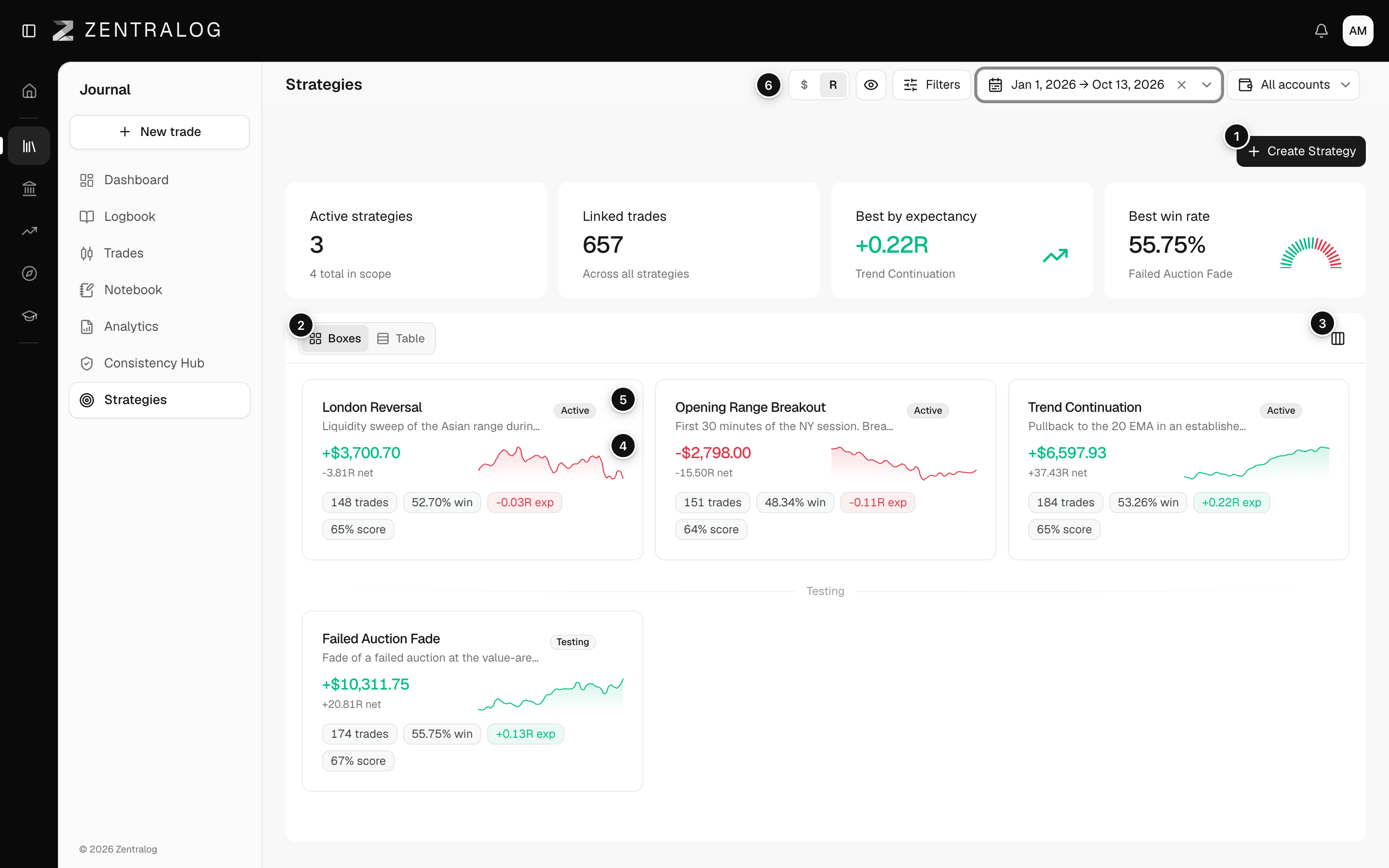
- Create Strategy: opens the editor for a new strategy and its criteria.
- Boxes / Table: switch between cards and a table with one row per strategy.
- Show / hide columns: pick the table columns and show archived strategies.
- Mini equity curve: the running total in R (profit or loss divided by the risk you planned). Without a stop on any trade, it says "No defined risk".
- ⋯ menu: edit, archive or delete the strategy.
- $ / R: show every number in money or in R.
Archive keeps the strategy and all its numbers. Delete is permanent and can't be undone.
FAQ
What happens to my trades if I delete a strategy?
The trades stay. They just lose the link and show no strategy.
What do the four tiles at the top show?
Active strategies, Linked trades, the strategy with the best expectancy (average result per trade) and the one with the best win rate.
Can I sort the table?
No. Click a row to open that strategy. Use Show / hide columns to add Profit factor, Score and other columns.
Related
Did this answer your question?