
Strategy context
The Context tab shows when, where and in which direction a strategy works best.
Updated 1 min read
Where: Journal → Strategies → a strategy → Context
Find where the strategy works
- Open a strategy and click the Context tab.
- In Time Heatmap, look for the strongest and weakest day and hour.
- Check Instruments for the markets that work and those that don't.
- Read Edge Concentration to see if one market carries all the profit.
- Compare long and short in Direction Bias.
Numbers here use expectancy, the average result per trade. Use the $ / R switch to change the unit.
What's on the screen
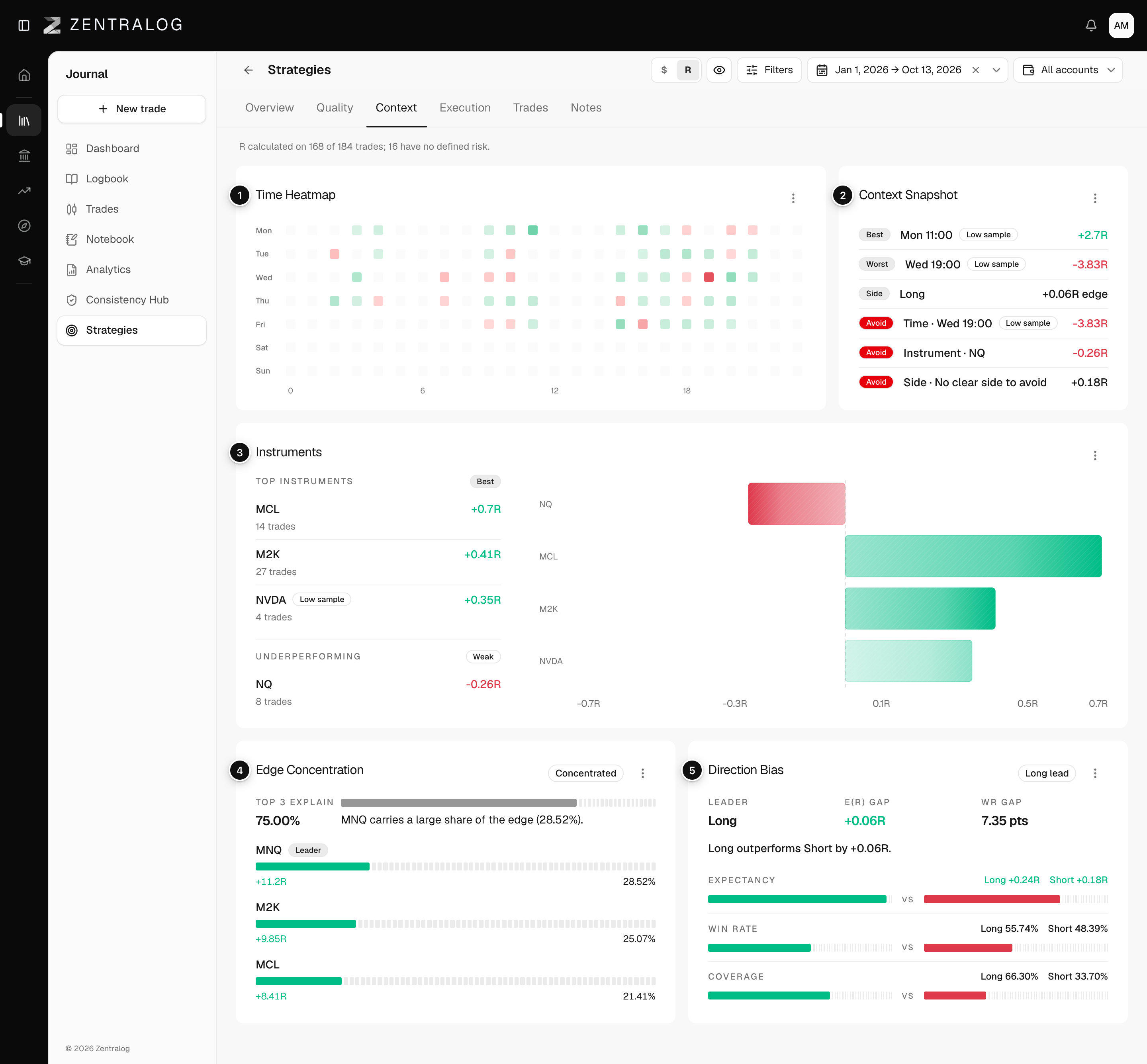
- Time Heatmap: results by weekday and hour.
- Context Snapshot: the best and worst context at a glance.
- Instruments: top and underperforming instruments.
- Edge Concentration: how much of the profit comes from your top few contexts. It says No edge, Fragile, Concentrated or Stable.
- Direction Bias: long versus short results (buying versus selling first).
FAQ
Which timezone does the heatmap use?
The timezone in your settings. Change it in Regional settings.
Why do some cells look empty?
There are no trades of this strategy on that day and hour, in the date range you picked.
Related
Did this answer your question?