
How trades work
A trade is one position from open to close, built from the buys and sells your broker filled.
Updated 2 min read
Where: Journal → Trades
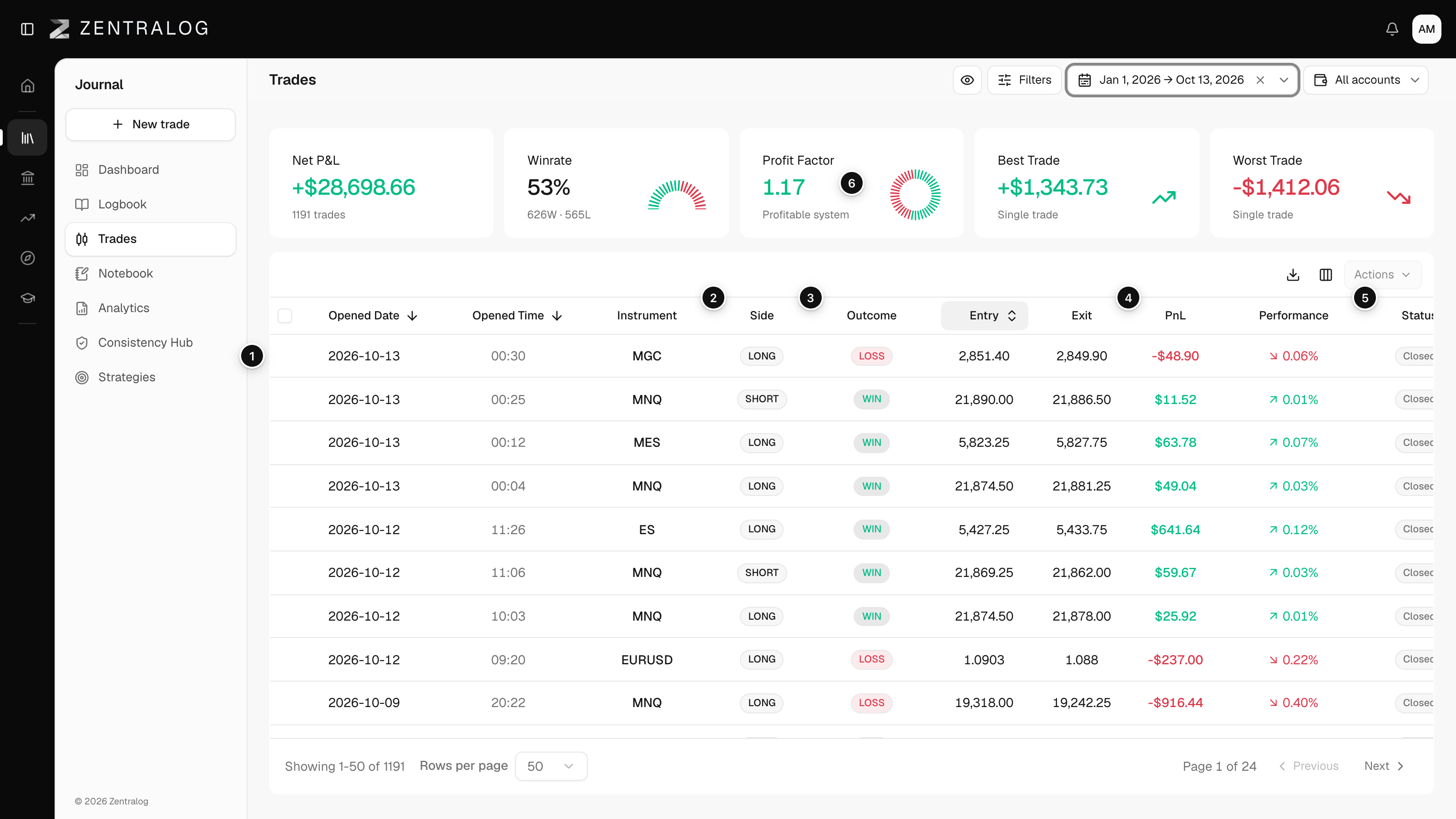
Read a trade row
- Open Trades in the Journal panel.
- Each row is one trade. It groups every execution (one buy or one sell) from the moment you open a position until you are flat again.
- Check Side: LONG if your first fill was a buy, SHORT if it was a sell. See long and short.
- Check Status: Open while the position still has contracts, Closed once it is flat.
- Read PnL and Outcome to see the result.
Zentralog does the grouping for you, whether trades come from auto-sync, a CSV file or manual entry. Partial exits and scale-ins stay inside the same trade.
How the result is calculated
- Gross P&L: profit or loss from price movement and size alone.
- Fees: broker commissions plus exchange and regulatory fees.
- Net P&L: gross P&L minus fees. The PnL column always shows net.
- Outcome: Win if net P&L is above your break-even threshold, Loss if it is below minus that threshold, BE in between.
Open trades show no outcome and stay out of your stats until they close.
What's on the screen
The numbers match the screenshot above.
- Trade row: one trade, built from its executions.
- Side: long or short, from the first fill.
- Outcome: Win, Loss or BE from net P&L.
- PnL: net P&L after commissions and fees.
- Status: Open until the position is flat.
- KPI row: totals recalculate for the current dates, accounts and filters.
You set the break-even threshold in Outcome and break-even. With a threshold of 5, a trade that nets +3 counts as BE, not Win.
FAQ
Why does one trade have more than two executions?
You scaled in or out. Every fill that belongs to the same position rolls into one trade. You can see them in the trade's Executions tab.
Why is my P&L different from my broker's?
Usually missing or different fees. See My P&L doesn't match my broker.
Related
Did this answer your question?